
Official CIBIL Subscription vs Free Credit-Score Apps: Is It Worth Paying For?
Information verified as of 17 August 2026
Google Pay, OneScore, Paisabazaar and other financial apps let users check their credit scores without paying. This raises an obvious question: why should anyone purchase a subscription directly from TransUnion CIBIL?
Paying CIBIL does not give you a different or “more genuine” scoring formula. When a third-party app explicitly states that its report is powered by TransUnion CIBIL, the credit information is being obtained from CIBIL with your consent.
The important differences are:
- How frequently the report can be refreshed
- Monitoring and alert features
- Access to reports from other credit bureaus
- Score-analysis tools
- Privacy and marketing consent
- Assistance with disputes
- Whether you can download an official report suitable for submission to a bank or NBFC
The final point becomes especially important when your report contains an unauthorised enquiry, credit card or loan.
CIBIL is a credit bureau, not a generic name for every credit score
India has four RBI-regulated credit information companies:
- TransUnion CIBIL
- Experian
- Equifax
- CRIF High Mark
Although “CIBIL score” is frequently used to describe any credit score, only a score generated by TransUnion CIBIL is technically a CIBIL score.
An Experian, Equifax or CRIF score is also legitimate. However, it may differ from your CIBIL score because:
- Each bureau uses its own scoring model.
- Information may reach different bureaus at different times.
- A lender’s latest update may not yet appear with every bureau.
- The reports may have been fetched on different dates.
Always check the bureau’s name and the report’s refresh date before comparing scores shown by different apps.
You are entitled to a free official report every year
Under RBI directions, each credit information company must provide an individual with one free full credit report, including the credit score, once in every calendar year, subject to authentication.
This means you may obtain one free annual report from each of the four credit bureaus, not merely one report across all four.
The RBI requires the free report to contain the same information appearing in the bureau’s most detailed report supplied to lenders. RBI’s Free Annual Credit Report direction
You can obtain the CIBIL version from the official free CIBIL report page.
The free CIBIL report allows you to:
- Check your official CIBIL score
- Review active and closed credit accounts
- Examine repayment history
- Check reported balances and credit limits
- Review lender enquiries
- Identify accounts or enquiries you do not recognise
- Raise disputes concerning incorrect information
The main limitation is frequency. After obtaining your annual free report, you generally need to wait until the next calendar year for another free report directly from CIBIL unless you purchase additional access.
What does a CIBIL report contain?
A CIBIL report contains considerably more information than the three-digit score.
According to CIBIL, the report includes sections covering:
- Personal information
- Contact information
- Employment information reported by lenders
- Loan and credit-card accounts
- Credit limits and outstanding balances
- Account status
- Monthly repayment history for up to 36 months
- Credit enquiries made by lenders
The report can include both active and closed credit facilities. Closing a credit card or repaying a loan does not automatically remove it from your credit history.
Your lender-enquiry history
The Enquiries section records occasions when a bank or financial institution accessed your CIBIL report, usually while processing a loan or credit-card application.
CIBIL says its consumer report shows lender enquiries from the previous 36 months. Each entry typically includes:
- Name of the lender
- Date of the enquiry
- Type or purpose of credit
- Application amount, where reported
This history can help you determine:
- Whether a bank checked your report after an application
- Whether multiple enquiries were generated for one application
- How frequently you have applied for credit
- Whether an enquiry appears that you do not recognise
- Whether someone may have attempted to obtain credit using your identity
Enquiry history is part of the CIBIL report itself. It is available in the free annual report as well as reports obtained through a paid plan. It is not exclusively a paid-subscription benefit. CIBIL’s guide to Accounts and Enquiries
Some third-party apps also display enquiry information. Google Pay, for example, says it displays the lender’s name, enquiry date and purpose.
Does checking your own score create an enquiry?
Checking your own score through CIBIL or an authorised partner does not lower your CIBIL score.
The enquiry shown in a CIBIL report is generally a lender enquiry created when a bank or financial institution accesses the report in connection with a credit application.
Therefore:
- Checking your own report does not damage your score.
- Applying for a loan or credit card can create a lender enquiry.
- Several credit applications can create several enquiries.
- CIBIL says repeated lender enquiries over a short period can affect your score.
What does the paid CIBIL subscription provide?
CIBIL’s paid plans provide repeated access to your CIBIL Score and Report during the subscription period.
According to CIBIL’s current support documentation, subscribers can refresh their reports daily. Depending on the selected plan, additional features can include:
- Unlimited access during the subscription period
- CIBIL Alerts
- Credit monitoring
- Score Simulator
- Personalised credit offers
- Online disputes and dispute assistance
The real-time notifications about report changes are available with its six-month and twelve-month subscription plans. Check the features attached to a particular plan before purchasing it. CIBIL subscription FAQs
Daily refresh does not mean daily changes
Daily refresh access means a subscriber can request the latest information available at CIBIL each day. It does not mean banks submit fresh information about every customer daily.
RBI has directed credit institutions and credit bureaus to update credit information on a fortnightly basis or at shorter mutually agreed intervals. The precise time at which a lender’s update becomes visible may still vary. RBI announcement on fortnightly credit reporting
Your report and score may remain unchanged even if you refresh them daily.
CIBIL’s Score Simulator
CIBIL’s Score Simulator is available to customers with an active paid subscription.
It lets users model hypothetical events such as:
- Opening a new loan
- Opening a new credit card
- Closing an account
- Paying down credit-card balances
- Clearing outstanding amounts
- Adding a late payment
- Adding a new enquiry
The resulting score is illustrative. Using the simulator does not modify your actual CIBIL report or score. CIBIL Score Simulator FAQs
Why the official CIBIL report matters when requesting a correction
Free apps are useful for monitoring your credit profile and discovering suspicious entries. However, an app dashboard or screenshot may not contain all the information a bank needs to trace and investigate its reporting.
If you discover an unauthorised enquiry, credit card, loan or incorrect account entry, obtain the latest report directly from CIBIL and send the relevant pages to the reporting bank or NBFC.
The official report contains the account or enquiry as recorded in CIBIL’s database. It may include identifiers such as:
- Enquiry Control Number or ECN
- Reporting lender’s name
- Enquiry date
- Enquiry purpose
- Account information
- Ownership classification
- Reported balance
- Account status
This is the most important practical difference between viewing CIBIL information through an app and obtaining the report directly from CIBIL:
- Use the free app to monitor your score and detect a possible problem.
- Download the latest official CIBIL report.
- Identify the disputed account or enquiry in that report.
- Send the relevant report pages to the bank or NBFC responsible for the entry.
- Quote the report number, ECN or account details in every complaint.
- Keep the report, complaint acknowledgement and correspondence as evidence.
Banks and NBFCs may ask for the official report or its identifiers before tracing and validating a disputed entry. Requirements can differ between institutions, so it would be inaccurate to claim that every bank accepts only one particular document.
Nevertheless, an app screenshot should not be treated as a substitute for the official report when formally requesting a correction.
The reporting institution must investigate the entry and confirm any correction to CIBIL. CIBIL cannot independently change lender-supplied information.
Raising a dispute does not require a paid subscription
You do not have to purchase a CIBIL subscription to raise a dispute.
CIBIL permits consumers who obtain the free annual report to challenge inaccuracies. A paid plan may provide continuous monitoring and dispute assistance, but the right to dispute incorrect information is not restricted to subscribers. CIBIL’s free-report FAQs
You can dispute information in the following sections:
- Personal information
- Contact information
- Employment information
- Account details
- Enquiries
Examples include:
- An account that does not belong to you
- An enquiry you do not recognise
- An incorrect outstanding balance
- An incorrect credit limit
- Incorrect account status
- Incorrect repayment or Days Past Due information
- Duplicate accounts
- Incorrect personal information
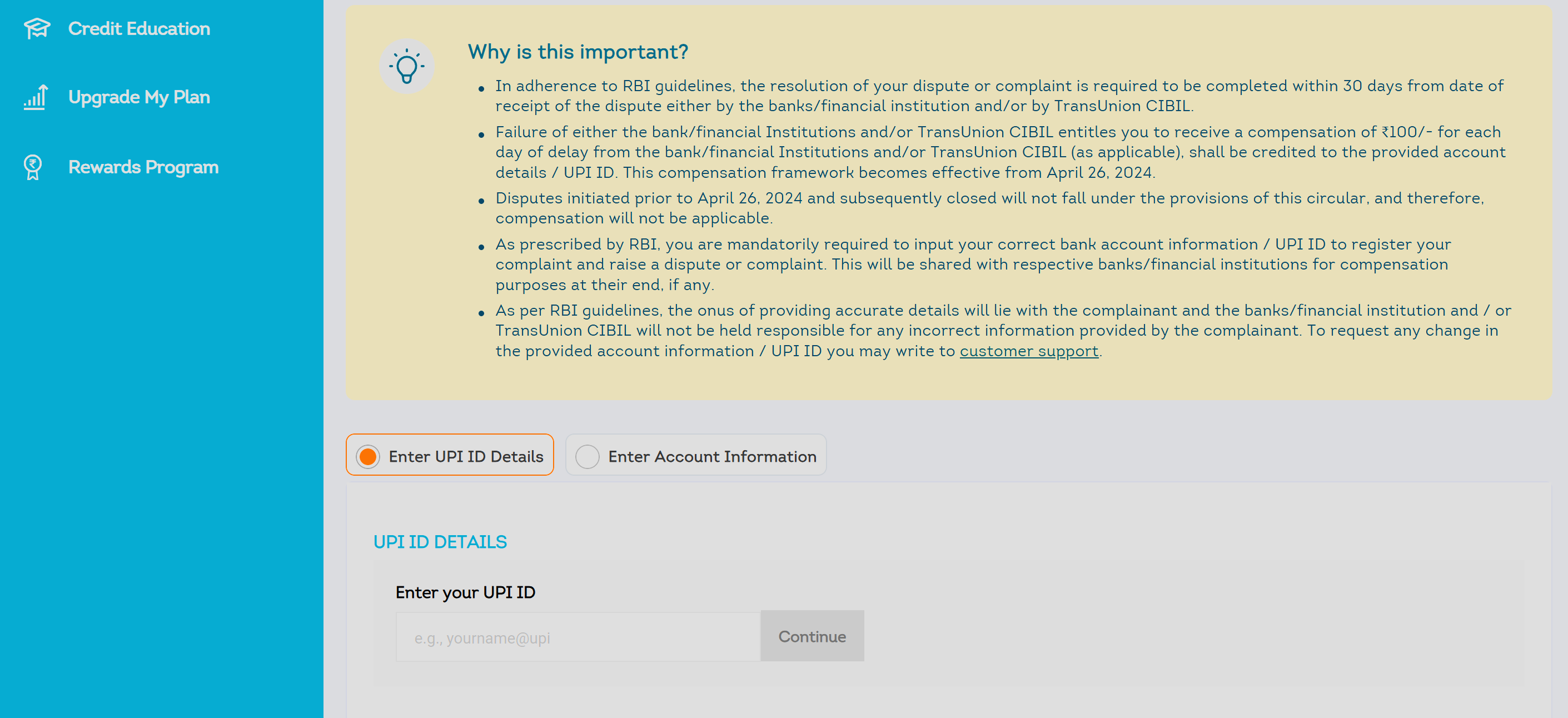
How the CIBIL dispute process works
Submitting a dispute does not allow CIBIL to immediately delete or modify a lender-reported entry.
CIBIL states that it cannot change lender-supplied information without confirmation from the relevant bank or financial institution.
The process generally works as follows:
- You identify an incorrect item in your official report.
- You submit a dispute to CIBIL and complain to the reporting lender.
- CIBIL performs an internal check and routes lender-related information to the institution concerned.
- The institution checks the application and account against its records.
- The institution either confirms the correction or rejects the request.
- CIBIL updates its records if the lender authorises corrected information.
- CIBIL communicates the dispute outcome to you.
You can dispute multiple fields in one submission. CIBIL says the disputed information may be marked as “Under Dispute” during the investigation. CIBIL’s dispute FAQs
If you do not recognise an enquiry, CIBIL permits you to dispute it and recommends contacting the lender concerned. CIBIL’s consumer-enquiry page
How long should a dispute take?
The bank or other credit institution and the credit bureau collectively have 30 calendar days to resolve a credit-information complaint.
Under the RBI framework:
- The credit institution has 21 calendar days to provide corrected information.
- The credit bureau has the remaining nine calendar days to complete the resolution.
- If resolution takes longer than 30 calendar days, the complainant may be entitled to ₹100 for each calendar day of delay.
- Compensation relates to the delay, not to whether the dispute is ultimately accepted.
This compensation framework has applied since 26 April 2024. Correct bank-account or UPI details may be required to receive compensation. CIBIL’s compensation framework
If the complaint remains unresolved after 30 days, or you are dissatisfied with the response, you may escalate it through the RBI Complaint Management System, subject to the applicable complaint requirements.
How free third-party apps obtain your score
Third-party apps generally do not calculate the CIBIL score themselves.
After receiving your consent and verifying your identity, the application requests information from CIBIL or another credit bureau and presents it through its own interface.
If an app explicitly identifies the result as a TransUnion CIBIL score, the data has been obtained from CIBIL. However, the score displayed by the app may differ from a freshly accessed report on CIBIL’s website if the two reports have different refresh dates.
A meaningful comparison requires:
- The same credit bureau
- The same consumer details
- The same or a similar report date
Comparison of verified services
| Service | Bureau access | Advertised refresh | Main features | Important limitation |
|---|---|---|---|---|
| Official CIBIL | TransUnion CIBIL | Daily during a paid subscription | Alerts on eligible plans, monitoring, Score Simulator and dispute assistance | Repeated direct access requires payment after the annual free report |
| Google Pay | TransUnion CIBIL | Monthly | Accounts, limits, utilisation, enquiries, recommendations and simulations | No daily on-demand refresh |
| OneScore | Bureaus available through the app | Monthly, according to its FAQ | Credit insights and score-change analysis | Confirm which bureau is currently displayed |
| Paisabazaar | CIBIL, Experian, Equifax and CRIF High Mark | Monthly | Four-bureau comparison and credit insights | Recurring consent and financial-product recommendations |
App features and bureau partnerships can change. Always verify the bureau name, refresh date, consent terms and available report details inside the application.
Google Pay
Google Pay states that its credit report is powered by TransUnion CIBIL and can be updated monthly.
According to Google, users can view:
- On-time and delayed payments
- Credit limits
- Utilisation percentages
- Lender enquiries
- Lender name
- Enquiry date and purpose
- A consolidated list of credit accounts
- Account creation and last-update information
- Recommendations based on the report
- Simulations of certain credit actions
Google Pay says it obtains transactional consent each time the user checks or refreshes the report. According to Google, this consent ends after that particular use.
If information is incorrect, Google Pay instructs the user to create a ticket with CIBIL. Google Pay’s CIBIL report guide
For someone who only needs monthly monitoring, Google Pay may provide much of the required information without a paid subscription.
OneScore
OneScore’s current FAQ says users can fetch reports from available credit bureaus every month without charge.
It also states that:
- Checking your score does not reduce it.
- Users can report discrepancies to the relevant bureaus through the app.
- Its “Find Out Why” feature analyses reasons for score changes.
Because bureau partnerships and app features can change, verify which bureau generated the score currently displayed by OneScore. A number should not automatically be described as a CIBIL score without confirming the bureau. OneScore FAQs
Paisabazaar
Paisabazaar advertises monthly credit-score and report access across:
- CIBIL
- Experian
- Equifax
- CRIF High Mark
This is useful for identifying differences between bureaus, for example when an account or enquiry appears in one report but not another.
Paisabazaar’s consent terms state that the user authorises it to obtain CIBIL information monthly. A single consent cannot be used for more than six months without renewal, and users have an option to withdraw from the service. Paisabazaar’s CIBIL consent terms
Paisabazaar is also a marketplace for loans and credit cards. Users should review its consent, privacy and communication settings before proceeding.
Why do third-party apps provide reports for free?
A free credit-report facility can help an app:
- Increase engagement
- Provide financial-health insights
- Recommend financial products
- Match users with loans or credit cards
- Offer its own financial services
This does not mean every free service sells personal data or generates unsolicited calls. Such a general claim would be inaccurate. Users should examine each application’s consent and privacy terms.
Before proceeding, check:
- Which bureau will be accessed
- Whether consent is one-time or recurring
- How frequently the report will be fetched
- Whether product recommendations are included
- Whether marketing communication is optional
- How consent can be withdrawn
- How the account and stored data can be deleted
When is the paid CIBIL subscription worth considering?
The subscription may be useful when:
- You need more frequent access than a monthly app provides.
- You are preparing for a major loan application.
- You are rebuilding your credit profile.
- You are monitoring a recently corrected account.
- You are concerned about identity theft.
- You want alerts available under an eligible plan.
- You want to use CIBIL’s Score Simulator.
- You prefer to monitor your report through CIBIL’s own dashboard.
It can be particularly useful when you are waiting for a lender to correct an inaccurate account and want to check the latest available report without waiting for a third-party app’s monthly refresh.
When is a free service sufficient?
A free service may be sufficient when:
- You only need monthly monitoring.
- Your report is stable and accurate.
- You are not expecting an important credit application.
- You mainly want to track your score, accounts and enquiries.
- The app clearly identifies the bureau and refresh date.
- You are comfortable with its consent and privacy terms.
A practical approach is:
- Obtain your free annual report directly from CIBIL.
- Review every account, payment record and enquiry.
- Use a verified third-party service for monthly monitoring.
- If the app reveals a problem, download the official CIBIL report.
- Send the official report and disputed entry details to the reporting bank or NBFC.
- Raise a dispute with CIBIL and preserve both acknowledgement numbers.
- Purchase a subscription only if you require daily refresh access, alerts or additional monitoring tools.
Conclusion
A paid CIBIL subscription does not produce a superior version of your score. Its primary value is frequent access and additional monitoring tools.
The enquiry history, including lender enquiries from the previous 36 months, is part of the CIBIL report and is available through the free annual report. Consumers also do not need a paid subscription to raise a dispute.
Third-party apps are useful for routine monitoring and detecting suspicious activity. However, if an app reveals an unauthorised enquiry, card or loan, obtain the latest official CIBIL report and send it to the responsible bank or NBFC.
The official report provides the documentary details needed to identify and investigate the disputed entry. A screenshot from a free app may alert you to the problem, but it may not be sufficient for a formal correction request.
For most consumers with an accurate and stable report, the free annual CIBIL report combined with monthly monitoring through a reputable app should be adequate. The paid subscription becomes more useful when you need frequent refreshes, alerts, direct monitoring or closer supervision of a dispute or upcoming credit application.